
Brother Printer Nozzle Check: How to Test & Improve Print Quality
| Jul 23, 2026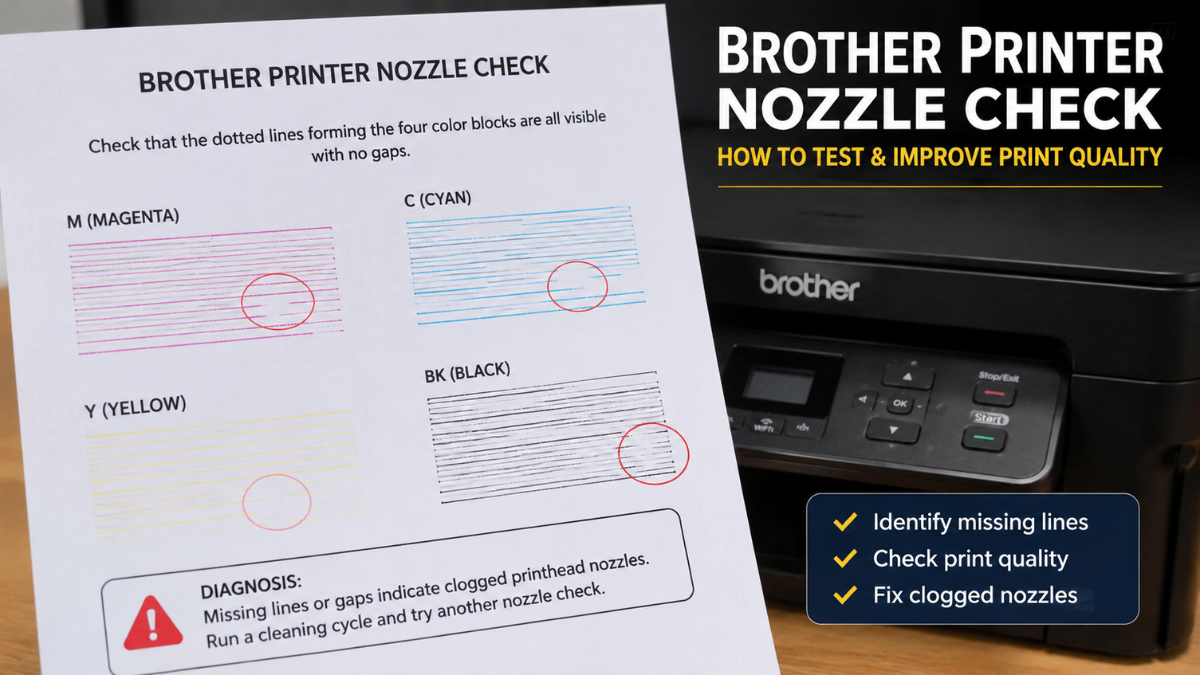
If your Brother printer is producing faded prints, streaks, missing colors, or blank lines, performing a Brother printer nozzle check is one of the easiest ways to identify the cause. This built-in maintenance feature checks whether the printhead is delivering ink properly, making it easier to spot clogged nozzles before they affect your documents and photos.
A Brother nozzle check only takes a few minutes and can save you time, ink, and frustration. Whether you’re seeing faded text, uneven colors, or poor image quality, this guide will walk you through the process step by step and help restore clear, consistent prints.
What Is a Brother Printer Nozzle Check?
A Brother printer nozzle check is a maintenance test that prints a pattern showing how well each ink nozzle is working. By examining the printed pattern, you can quickly determine whether ink is flowing properly or if one or more nozzles are clogged.
Running a Brother nozzle check regularly helps maintain print quality and allows you to catch small issues before they become bigger problems.
If your Brother printer has been sitting unused for a while, you may begin noticing symptoms such as faded documents or even a Brother printer printing blank pages issue. Performing a nozzle check early can help identify whether clogged nozzles are the cause.
When Should You Perform a Brother Nozzle Check?
There are several situations where performing a Brother nozzle check is recommended:
- Prints appear faded or blurry.
- Colors are missing or look uneven.
- Black text is incomplete.
- White lines appear across printed pages.
- Your printer has been unused for several weeks.
- You recently installed new ink cartridges.
If you notice any of these signs, a nozzle check is the best place to start before attempting other maintenance procedures.
How to Perform a Brother Printer Nozzle Check
Although menu options vary slightly between Brother printer models, the overall process is very similar following step-by-step Instructions:
Step 1: Load Plain Paper
Place clean letter-size or A4 paper into the paper tray.
Step 2: Open the Maintenance Menu
Using the printer’s control panel:
- Select Settings or Maintenance.
- Navigate to Ink or Print Quality.
- Choose Nozzle Check.
Some Brother printers may also allow you to start the test from the Brother printer software installed on your computer.
Step 3: Print the Nozzle Check Pattern
The printer will print a page containing several colored patterns.
This Brother printer nozzle check pattern allows you to inspect every ink color for missing lines or gaps.
Step 4: Inspect the Results
Look closely at each pattern.
A healthy nozzle check should display:
- Straight, continuous lines
- No missing sections
- Even color distribution
If you notice broken lines or gaps, clogged nozzles are likely affecting print quality.
How to Read a Nozzle Check Brother Printer Test
Understanding the results of the nozzle check Brother printer test helps determine your next step.
Normal Pattern
If every color prints cleanly without missing lines, your printhead is functioning correctly.
In this case, poor print quality may be caused by:
- Incorrect print settings
- Low-quality paper
- Old ink
- Image quality issues
Missing Lines or Gaps
If you see gaps in one or more colors, it’s time to run the printer’s built-in printhead cleaning function.
After cleaning, print another Brother printer nozzle check to verify whether the problem has been resolved.
What Is a Print Head Nozzle Check Brother Test?
Brother Printer Nozzle Check: Why It Matters
Some users search for a print head nozzle check Brother test when they’re experiencing print quality issues.
Although the wording differs slightly, it refers to the same maintenance process—a nozzle check that evaluates whether ink is flowing correctly through the printhead.
Think of it as a quick health check for your printer’s ink delivery system.
What If the Nozzle Check Fails?
If the nozzle check shows missing lines, don’t panic.
Try these simple solutions:
Run a Printhead Cleaning Cycle
Most Brother printers include an automatic printhead cleaning feature.
Run one cleaning cycle, then print another nozzle check.
Avoid performing multiple cleaning cycles back-to-back because they consume ink.
Check Your Ink Levels
Very low ink levels can affect print quality.
Replace empty cartridges before repeating the test.
Reinstall the Ink Cartridges
If your printer recently displayed a Brother printer not recognizing new ink cartridge message, remove and reinstall the cartridge carefully to ensure it is seated correctly. Also confirm that the cartridge is compatible with your specific Brother printer model.
Restart the Printer
Sometimes a simple restart clears temporary communication issues.
Turn the printer off, wait one minute, and power it back on before repeating the nozzle check.
Can Compatible Ink Cartridges Affect the Nozzle Check?
Many users wonder whether compatible ink cartridges cause nozzle problems.
High-quality compatible cartridges designed for Brother printers generally provide reliable performance. However, low-quality cartridges or improper installation may contribute to inconsistent print quality or poor ink flow.
If you continue experiencing nozzle issues, inspect both the cartridges and the nozzle check pattern before assuming the cartridges are at fault.
Tips to Maintain Excellent Print Quality
Preventive maintenance helps reduce clogged nozzles and keeps your printer working efficiently.
Follow these simple habits:
- Print at least one page every week.
- Keep your printer in a clean, dry location.
- Avoid allowing cartridges to run completely empty.
- Turn the printer off using its power button.
- Run a nozzle check whenever you notice fading or streaks.
These small maintenance habits can help prevent future print quality problems and reduce the chances of clogged nozzles.
Final Thoughts
Performing a Brother printer nozzle check is one of the quickest and most effective ways to diagnose print quality issues before they become more serious. By making a Brother nozzle check part of your regular printer maintenance routine, you can identify clogged nozzles early, maintain sharp, consistent prints, and reduce unnecessary troubleshooting.
If the nozzle check reveals missing lines or uneven colors, follow it with a printhead cleaning cycle and repeat the test. With regular maintenance and quality ink cartridges, your Brother printer can continue delivering reliable results for years to come.
Frequently Asked Questions
1. How often should I perform a Brother printer nozzle check?
Only perform a nozzle check when you notice print quality problems or after your printer has been unused for an extended period. It is also a good idea after installing new ink cartridges.
2. What is the difference between a nozzle check and printhead cleaning?
A nozzle check diagnoses print quality by printing a test pattern, while printhead cleaning attempts to remove dried ink or clogs from the nozzles. A nozzle check is typically performed before deciding whether cleaning is necessary.
3. What does a nozzle check pattern tell me?
A nozzle check Brother printer pattern shows whether each ink color is printing correctly. Missing lines or gaps usually indicate clogged nozzles that require cleaning.
4. Why is my Brother printer still printing poorly after a nozzle check?
If print quality doesn’t improve, try running a printhead cleaning cycle, checking your ink levels, reinstalling the cartridges, or reviewing your printer settings. Hardware issues or damaged cartridges may also be contributing to the problem.
Related Articles
What Is a Printhead? Troubleshooting Clogs and More!
Brother Printer Not Recognizing New Ink Cartridge? How to Fix It Fast
Are Compatible Ink Cartridges Safe for My Printer?
Stop Brother Printer Printing Blank Pages: Easy Solutions Inside