
Top Printer for Graphics: A Complete Buying Guide for Designers
| Jan 16, 2026
Great design deserves great printing. What looks perfect on screen can lose its impact the moment it hits paper if you’re using the wrong printer for graphics. Graphic designers need more than basic printing—they need precision, color accuracy, and consistency. This is where the choice between a laser printer vs inkjet printer becomes critical for professional results. A dedicated printer for graphic design helps bring digital concepts to life without compromising detail or tone. Unlike casual printers, printers for designers are built to handle creative workloads and specialty media. The right setup can instantly improve client trust and project quality. Whether you print from a home studio or a growing business, selecting the best printer for graphic design saves time and money. Many good printers for graphic designers also support advanced sizes like an 11x17 printer or even for sublimation needs.
In this blog, you’ll learn:
- What graphics printing is and how it differs from regular printing
- What features matter most in a graphic printer
- A breakdown of the best graphics printer choices for home and business use
What Is Graphics Printing?
Graphics printing focuses on printing visuals, not text. It prioritizes sharp details, smooth gradients, and accurate colors. A dedicated printer for graphics is built to handle complex designs that standard printers cannot. This is why professional printers for designers use advanced ink systems and better media handling.
Designers rely on the best printer for graphic design to maintain control over how their work appears in print.
Common Use Cases: Portfolios, Posters, Illustrations, Client Proofs
Graphics printing is commonly used for:
- Design portfolios
- Posters and marketing visuals
- Illustrations and artwork
- Client proofs and mockups
How Graphics Printing Differ from Regular Printing?
| Feature | Standard Document Printing | Graphics Printing |
|---|---|---|
| Color Accuracy | Limited, may shift | High, consistent for branding and design |
| Detail & Resolution | Basic, suitable for text | Sharp lines, smooth gradients, fine detail |
| Media Compatibility | Standard office paper | Photo paper, fine art paper, canvas, specialty media |
| Output Quality | Adequate for drafts | Professional, vibrant, clean visuals |
| Printer Purpose | Text and speed | Visuals, precision, and design work |
Why a Dedicated Printer for Graphic Design Is Important
A dedicated graphic printer for design directly affects print quality, workflow, and client satisfaction. Designers who use the right printer for graphics reduce errors, avoid reprints, and maintain professional standards.
- Client Expectations and Professional Output: Clients expect printed designs to match digital files. A reliable printer for graphic design delivers accurate colors and clean finishes that meet professional expectations.
- Visualizing Final Designs Before Delivery: Printing designs before delivery helps identify layout or color issues. A dependable printer allows designers to review work accurately before final submission.
- Consistency Across Print Runs: Consistency is essential for branding and repeat projects. The best graphic printer for design ensures every print looks the same, even over time.
- Long-Term Benefits for Freelancers and Studios: Using one of the good printers for graphic designers saves money and time. It reduces outsourcing, improves efficiency, and delivers reliable quality. For freelancers and studios, a quality printer is a practical investment.
Key Factors to Consider When Choosing the Best Printer for Graphics
Choosing a printer for graphics requires checking color, resolution, media, size, connectivity, and cost. The laser printer versus inkjet printer choice matters, but other features determine professional quality. A reliable printer for design ensures consistency and efficiency for home studios and businesses.
1. Color Accuracy and Color Gamut
Accurate color is essential. Multi-ink systems and built-in calibration keep prints consistent. The best printer for design ensures portfolios, proofs, and artwork match your digital files. Printers for designers handle color-sensitive projects reliably.
2. Resolution and Image Detail
High DPI ensures sharp text, smooth gradients, and fine detail. A printer for graphic design, including an 11x17 printer, reproduces every line and texture perfectly. The best graphics printer delivers professional-quality illustrations and photos.
3. Inkjet vs Laser Printer
- Inkjet: Best for color, detail, and specialty media like canvas or vinyl. Slower and costlier per page.
- Laser: Faster, cheaper per page, but less ideal for high-color work.
4. Media Handling
Supports photo, fine art, canvas, and vinyl. Borderless and custom-size printing are key. Some also serve as a printer for sublimation. Matching media to printer tech ensures sharp, consistent output.
5. Print Size and Large Format
Standard printers cover small prints; large format printers for designers handle posters, banners, and portfolios. An 11x17 printer or wider allows flexible professional layouts.
6. Speed and Connectivity
Fast printing improves workflow. Wi-Fi, Ethernet, and USB connections are essential. Compact models suit home use; studio printers handle heavy workloads. The right printer for graphic design keeps projects efficient.
7. Budget and Running Costs
Look beyond printer price. Ink, refills, and maintenance affect costs. Efficient systems reduce expenses. The best printer for design balances price and long-term savings. A quality printer for graphics delivers professional results without overspending.
Best Printer for Graphics of 2026
Here are some of the top printers ideal for graphics and photo printing, from high-performance professional models to versatile all-in-one printers perfect for creative work.
1. Epson SureColor SC-P700
- Ink System: Inkjet with Black Enhance Overcoat technology for finer detail and texture
- Media Sizes: Supports multiple media types (photo paper, fine art paper, canvas, etc.) – flexible handling
- Approx. Price (US): ~$940 USD
- Best For: Designers and photographers needing high-quality, detailed prints in a compact, flexible printer suitable for home studios or small businesses
2. Canon imagePROGRAF PRO-300
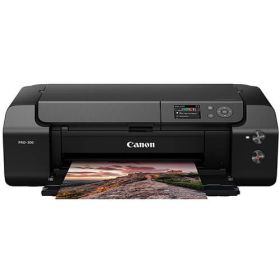
- Ink System: 10 LUCIA PRO pigment-based inks with dedicated Chroma Optimizer and Matte Black ink for vivid colors and deep blacks
- Media Sizes: Up to A3+ (borderless printing possible, custom panoramic prints up to 990.6 mm)
- Approx. Price (US): ~$900–$1,100 USD
- Ink Cartridges: Canon PFI-300CO Ink Cartridges
- Best For: Photographers and designers seeking professional-quality, borderless prints with precise color, tonal control, and versatile media handling for home studios or small businesses
3. Epson EcoTank ET-8550
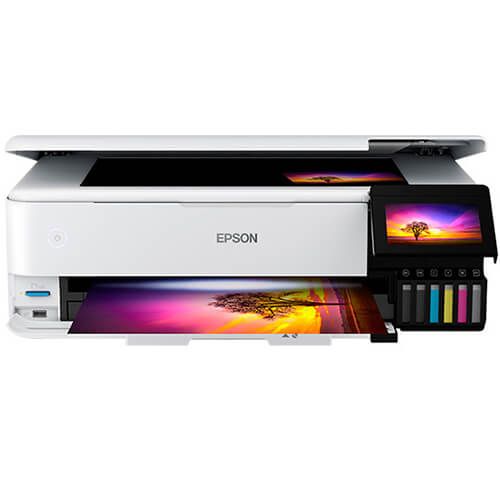
- Ink System: 6-color Epson Claria ET Premium ink system with pigment black and grey ink for sharp text and long-lasting photos
- Media Sizes: Up to A3+; supports photo paper, craft papers, cards, CDs/DVDs, and media up to 1.3 mm thick and 2 m long
- Approx. Price (US): ~$895 USD
- Ink Bottles: Epson 522 Ink Bottles
- Best For: Designers and photographers who want economical, high-volume printing with Wi-Fi connectivity, flexible media handling, and professional-quality prints at home or small studios
4. HP DesignJet T630 24"
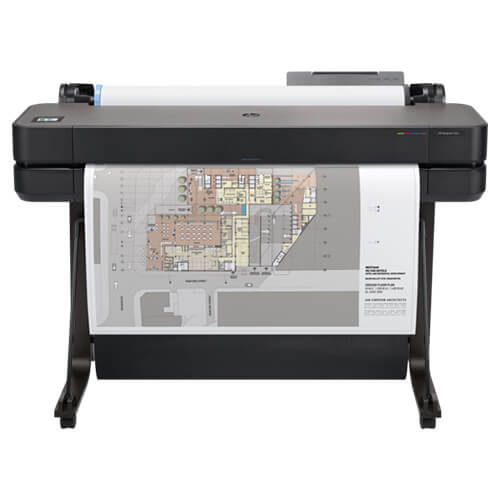
- Ink System: HP large-format ink system (optimized for CAD, maps, and technical drawings)
- Media Sizes: Auto sheet feeder: A4, A3; manual feed: A4, A3, A2, A1; supports roll feed, sheet feed, media bin; includes automatic horizontal cutter
- Approx. Price (US): ~$1,285 USD
- Ink Cartridges: HP 712 Ink Cartridges
- Best For: Architects, engineers, and designers who need fast, high-resolution large-format printing for CAD drawings, maps, and technical plans in offices or studios
5. Canon PIXMA PRO-200
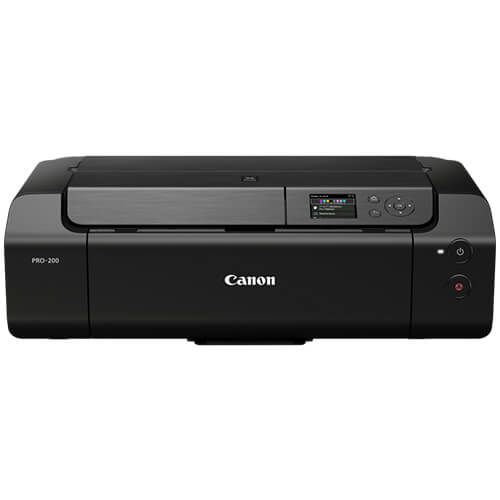
- Ink System: 8-color dye-based ink system for rich, vibrant prints
- Media Sizes: Prints up to 13" x 19" (A3+); borderless printing; custom sizes up to 13" x 39"
- Approx. Price (US): Currently unavailable (~$650–$750 USD when in stock)
- Ink Cartridges: Canon CLI-65 Ink Cartridges
- Best For: Photographers and designers who need high-quality, compact, home or studio-friendly printers with versatile media support and wireless connectivity.
Common Mistakes to Avoid When Buying a Printer for Graphic Design
Buying the wrong printer for graphics wastes time and money. A proper printer for graphic design must deliver color accuracy, media flexibility, and low running costs.
Choosing Office Printers for Graphics Work
Office printers cannot handle high-resolution images, fine gradients, or specialty media. Even good printers for graphic designers outperform office machines. Always choose a dedicated printer for professional-quality results.
Ignoring Ink and Maintenance Costs
Ink, refills, and maintenance impact overall cost. Refillable models or printers for sublimation options save money long-term. Even an 11x17 printer can be expensive if ink efficiency is poor. The best printer for graphic design balances upfront price with running costs.
Overlooking Media Compatibility
Check if the printer supports photo paper, fine art paper, cards, and large-format prints. Borderless and custom-size printing is essential. Proper media handling ensures these printers for designers deliver consistent, high-quality output.
Final Thoughts
Choosing the right printer for graphics depends on your design needs. Consider color accuracy, resolution, media compatibility, and print size when selecting a printer for graphic design. High-detail work may require multi-ink systems, while large prints need an 11x17 printer or large-format model. Borderless printing and printer for sublimation support expand creative options. Home designers benefit from compact, versatile printers for designers, while studios may need faster, high-volume models. Investing in the best printer for design ensures consistent, professional results and saves time and money over reprints. The right printer elevates your work and client satisfaction.
Explore our curated selection of the best graphics printers and find the perfect graphic design printer to bring your creations to life today!
Frequently Asked Questions:
1. Can any printer be used for graphic design work?
Standard office printers lack the color accuracy, detail, and media versatility needed for professional designs. A dedicated printer for graphic design ensures high-quality visuals and consistent results.
2. Are laser printers better than inkjet printers for graphics?
Inkjet printers typically outperform lasers for high-resolution, color-sensitive graphics and photo printing. The choice between laser printer and inkjet printer depends on your workflow and print volume.
3. Is ink cost negligible when choosing a printer?
Running costs, refill systems, and maintenance can significantly impact total expenses. Even high-end printers require efficient ink management for cost-effective operation, making it important when choosing the best printer for graphic design.
Related Articles
Laser Printer vs Inkjet Printer: Which is best for Business?
6 Best Printer for Sublimation: Get Vibrant, Durable Prints!