
Why You Should Print a Test Page Regularly | CompAndSave
| Dec 03, 2025
You’ve just bought a new printer, ready to print everything from documents to photos at home. But after a few prints, you notice the colors aren’t quite right, or some lines are missing. What’s going on?
Regularly printing a printer test page helps you catch issues early. Whether your printer is brand new or has been sitting unused, taking a moment to print a test page lets you check if everything’s connected properly, ink levels are sufficient, and print quality is where it should be, saving you from wasting ink, paper, and time.
In this guide, we’ll explain what a test page is, why test page printing is important, how it can save you money and time, and how to use it with your printer, whether it’s Epson, HP, Canon, or another brand.
What Is a Test Page?
A test page is a page to print to test printer and verify that it’s working properly. It acts like a quick health check for your printer.
When you print a test page, you can see if your printer is:
- Printing colors correctly
- Producing clear text and images
- Properly aligned without blurry or crooked prints
- Free of streaks, lines, or missing ink areas
So, What Does a Test Page Usually Include?
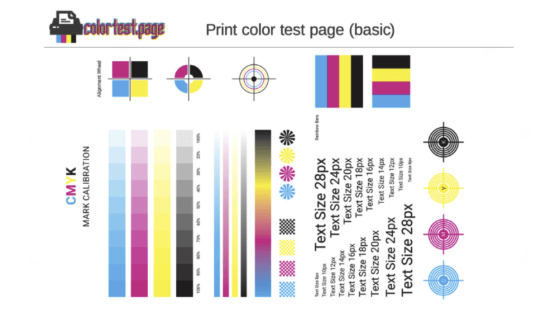
Image Source: Color Test Page
- Color blocks: Solid patches of colors like cyan, magenta, yellow, and black to check ink quality
- Grayscale patterns: Shades from black to white to test smooth color blending
- Text samples: Different fonts and sizes to check clarity
- Lines and grids: To verify print alignment and detect any distortion or misalignment
By reviewing the test page, like the sample above, you can spot problems like clogged nozzles, low ink, or alignment issues before they affect your regular printing jobs.
Why Is Printing a Test Page Important?
Printing a test page might seem like a small, simple step, but it can make a big difference in how well your printer works. By checking your printer regularly, you can catch issues early, avoid wasting ink and paper, and ensure your prints always look their best. Here’s why making test page printing a habit is so important for every printer user.
1. Find Print Quality Problems Early
The main reason to print a test page is to catch any print quality issues before they affect your important documents or photos.
For example:
- Faded or missing colors: An ink cartridge may be low, or the printhead may be clogged. A color page for printer test shows if any colors are weak or missing.
- Streaks or lines: These indicate the printhead may be dirty or damaged.
- Blurry or misaligned text: This suggests your printer may need adjustment.
When you see these problems on the printer print test page, you can fix them before wasting ink and paper on bad prints.
2. Avoid Printer Problems During Important Printing
Imagine getting ready to print a report, presentation, or photo, only to have your printer suddenly jam, print faded pages, or stop working. It’s stressful, inconvenient, and wastes both time and supplies.
Printing a test page ahead of time helps you catch those issues before they interrupt important tasks. By doing this quick check, you can make sure:
- Your ink or toner levels are enough for the job
- The printhead isn’t clogged
- Colors and text are coming out clearly
- Your printer is running smoothly and is ready to go
This simple step gives you peace of mind and helps ensure your printer won’t let you down when it matters most.
3. Save Ink, Toner, and Paper
Printers don’t always warn you clearly when ink or toner is low or when something needs cleaning. If you keep printing without checking, you might waste ink, toner, and paper on bad prints.
A color print page test indicates whether cartridges are low or your printer is having trouble applying ink evenly to the paper. This helps you replace ink only when needed, saving you money.
4. Keep Colors Accurate and Prints Sharp
If you print photos or any document where color matters, printing a color test page helps ensure your colors are accurate and vibrant.
Printers can lose color accuracy over time because of worn parts or ink issues. Regularly printing a test page ensures your prints remain vibrant and look as expected.
5. Make Your Printer Last Longer
Like any machine, printers last longer when you take care of them. Using test pages to check your printer regularly helps prevent issues such as clogged nozzles or dried ink, which can cause damage.
Regular checks keep your printer running smoothly and can prevent costly repairs or the need to buy a new one.
How to Print a Test Page: Easy Steps
Printing a test page is quick and simple, and you can do it directly from your printer or your computer. You don’t need any special tools or technical skills — just a few clicks. Whether you’re checking your printer before a big job or doing routine maintenance, these easy steps will help you print a test page in minutes.
From the Printer Itself
Most printers let you print a test page directly from the printer:
Step 1: Go to the Settings or Menu on your printer’s screen.
Step 2: Find Maintenance or Tools.
Step 3: Choose Print Test Page or Nozzle Check.
Step 4: Press OK and wait for the page to print.
From Your Computer
You can also print a test page from your computer’s printer settings:
A. WINDOWS:
Step 1: Open Control Panel > Devices and Printers.
Step 2: Right-click your printer and choose Printer Properties.
Step 3: Click Print Test Page.
B. MAC:
Step 1: Open System Preferences > Printers & Scanners.
Step 2: Select your printer.
Step 3: Click Options & Supplies > Utility.
Step 4: Click Print Test Page.
Using a Printable Test Page
If you don’t have a built-in test page option, you can download a printable test page from the internet. These pages usually have:
- Blocks of solid colors (cyan, magenta, yellow, black)
- Grayscale shades
- Text and line patterns
- Alignment grids
Just open the file and print it like any other document.
What to Check on a Test Page
Once your test page prints, please review it carefully. This quick review helps you spot early signs of problems before they affect your regular printing. Here’s what you should check and why it matters:
1. Colors
All colors should appear solid and even.
Look for faded areas, missing sections, or streaks.
If a color is weak or missing, it may mean:
- Your ink or toner is running low
- The printhead is clogged
- The cartridge isn’t installed properly
2. Lines
Test pages usually include patterns or grids with thin lines.
These lines should be straight, sharp, and complete.
If you see extra lines, broken lines, or wavy edges, this could signal:
- Printhead alignment issues
- Dirty nozzles
- Mechanical problems inside the printer
3. Text
The text should be clean, sharp, and easy to read.
If it appears smudged, blurry, or uneven:
- Your printer may need alignment
- The paper type may be incorrect
- The print quality settings may be too low
4. Alignment
Colors and shapes should line up perfectly, with no shadows or overlapping areas.
Misalignment often looks like double printing or “ghosting.”
This usually means your printer needs:
- A printhead alignment
- A roller cleaning
- A check for loose or worn parts
If you spot anything unusual, run your printer’s cleaning or alignment tools, or replace cartridges if needed. These quick fixes can save you from bigger headaches later.
How Often Should You Print a Test Page?
Printing a test page isn’t something you only do when something goes wrong. It’s a small habit that keeps your printer reliable. A few seconds now can save you from wasting ink, paper, and time later.
Here’s when you should run one:
- Every week: If you print often or rely on your printer for school, work, or business, a weekly test page keeps the ink flowing and helps you spot problems before they slow you down.
- Before big print jobs: Run a test page before printing long reports, forms, or photo sets to ensure everything is working properly and you don’t waste a whole stack of paper.
- After changing cartridges: A test page helps confirm the new ink or toner is installed correctly and shows if the colors or black text print smoothly.
- If you notice print problems: Anytime prints come out streaky, faded, or spotty, a test page helps you figure out what’s wrong so you can clean the printhead, realign the printer, or replace ink.
Final Thoughts
Failing to print a test page regularly can lead to wasted ink, paper, and valuable time, and to poor-quality prints that damage important documents. Making test page printing part of your routine protects you from unexpected print failures and costly reprints.
If it’s time to replace ink or toner cartridges, CompAndSave offers great prices and reliable products to keep your printer running smoothly. Keep your prints sharp and your printer healthy. Start printing test pages regularly today!
Frequently Asked Questions
What is a test page and why should I print one?
A test page for colour printer is a specially designed page that helps you check how well your printer is producing colors. Printing this page helps you verify that all colors are printed correctly and evenly, so you can spot issues such as streaks, missing colors, or faded prints early.
How do I do a color printer test print?
Doing a color printer test print is simple and usually built into your printer’s settings. You can print one directly from your printer’s menu or your computer’s printer settings. This printout includes blocks of color, text, and patterns to help you verify that your printer delivers vibrant, accurate colors without streaks or gaps. Regularly doing a color test print helps catch problems early and keeps your prints looking sharp.
Why is my color test print showing streaks or missing colors?
If your color test print shows streaks, faded areas, or missing colors, it usually indicates that your printer’s nozzles are clogged or the ink cartridges are low. Running a printhead cleaning cycle or replacing low cartridges often fixes this.
Related Articles:
Printer Test Page Done Right: How-to Guide for Windows & Mac
Printer Smear Problem? Here’s How to Fix Ink Smearing Instantly
Printer Wrinkling Paper: Top Causes, Fixes, and Prevention Tips